Why Mobile Safety Apps Fail in Emergencies (And What Replaces Them)
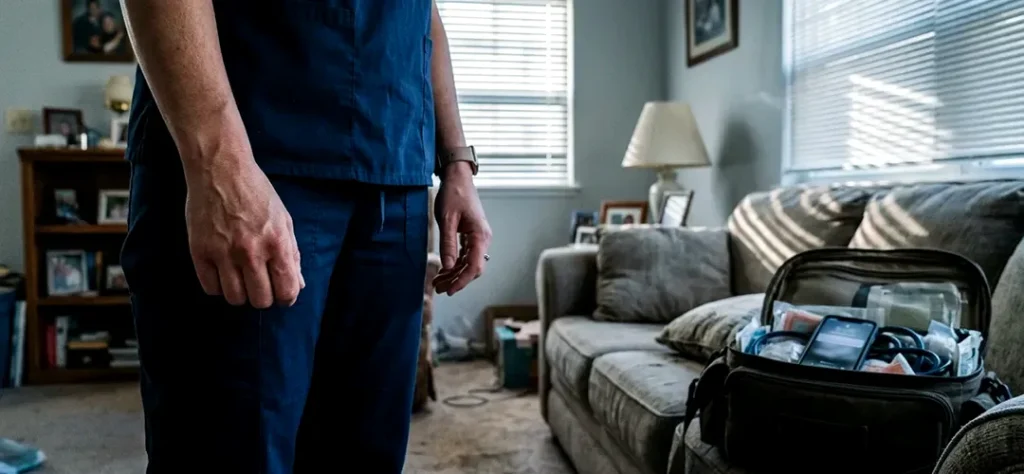
The False Assumption Behind App-Only Safety Solutions
Most healthcare organizations that have invested in employee safety technology have landed on the same starting point: a smartphone application. The logic is straightforward. Every clinician carries a phone. An app is inexpensive to deploy. No hardware to manage. No devices to charge or track.
The underlying assumption is simple: everyone has a phone, so we’re covered.
That assumption holds in calm, controlled environments. It collapses in the moments when safety technology actually matters. Emergencies are not calm. They are chaotic, fast-moving, and physically unpredictable. A clinician facing a threatening patient or an aggressive family member is not standing in a quiet room with her phone in hand, calmly evaluating her options. She is managing fear, calculating escape routes, and trying to maintain composure while her adrenaline spikes.
The gap between “having access to a safety tool” and “being able to use a safety tool under duress” is where most app-only safety strategies break down.
Where Phone-Based Emergency Tools Break Down
- Locate the phone (pocket, bag, counter, car)
- Unlock the device (passcode, biometric, swipe)
- Find and open the app
- Navigate to the alert function
- Confirm the alert
The Difference Between Access and Action
The distinction operations and risk leaders need to internalize is the difference between access and action.
Access means the employee has a safety tool available to them. Action means the employee can activate that tool instantly, under duress, without any steps that require fine motor control, visual attention, or overt behavior.
Most smartphone emergency tools provide access. Few provide action.
This is not a design flaw unique to any single application. It is a structural limitation of any safety system that depends on a phone screen as the primary interface during a crisis. Phones are designed for deliberate, focused interaction. Emergencies demand the opposite: reflexive, instantaneous response with minimal cognitive load.
Healthcare organizations running five to eight solo home visits per clinician per day, across dozens or hundreds of clinicians, are generating thousands of exposure moments every week. Each one of those moments is a scenario where the difference between access and action determines whether an employee can call for help when they need it most.
What Replaces the App-Only Model
The organizations rethinking their approach to clinician safety are moving toward systems designed around one principle: eliminate activation friction entirely.
What that looks like in practice:
One-touch activation. A single physical press triggers an alert. No screen. No unlock sequence. No navigation. The employee’s hands never need to leave their side, and the action is fast enough to execute during a moment of escalation, not after it. Silent Beacon’s wearable panic button is built around this principle: one press activates an alert without any phone interaction required.
Silent, discreet alerting. In high-risk confrontations, the ability to call for help without alerting an aggressor can be the difference between a safe resolution and an escalation. Silent Beacon includes a dedicated silent alert mode that allows clinicians to trigger a response without any visible or audible indication, keeping the employee in control of the situation while help is dispatched.
Direct 911 calling. Many app-only systems send internal notifications to supervisors or monitoring teams. That creates a second layer of delay: the supervisor receives the alert, assesses the situation, and then decides whether to contact emergency services. Silent Beacon is the only business panic button that calls 911 directly, removing the intermediary step when seconds matter most. The device pairs via Bluetooth to the clinician’s smartphone, using the phone’s existing cellular, Wi-Fi, or satellite connectivity to place the call. No separate infrastructure, cellular plan, or device connectivity is required.
Real-time location during active alerts. When a clinician triggers an alert, supervisors and emergency responders need to know exactly where that person is. Silent Beacon shares GPS location data only when an alert is active, giving response teams the information they need while maintaining employee privacy during normal operations. Footsteps Mode extends this further, sharing live location with designated contacts for real-time route monitoring during home visits.
Hands-free two-way communication. A clinician in distress should not need to hold a phone to her ear to communicate with responders. Silent Beacon’s built-in speaker and microphone enable two-way conversation directly through the wearable device, keeping the clinician’s hands free and maintaining situational awareness.
What This Means for Operations and Risk Leaders
For COOs, VP Clinical Operations, and Chief Risk Officers at home health and behavioral health organizations, the question is not whether your clinicians have access to a safety tool. The question is whether they can use it in the 10 seconds that matter most.
If your current safety infrastructure depends on a smartphone screen as the primary emergency interface, it is worth evaluating whether that approach matches the reality of how your clinicians work: alone, in private residences, in situations that can shift from calm to dangerous without warning.
The organizations closing this gap are deploying wearable, single-action emergency alert platforms that eliminate friction, enable discreet activation, and connect employees directly to emergency response. A 40-plus day rechargeable battery and deployment timelines under one week mean IT and operations teams can have clinicians protected without a prolonged rollout.
The question is whether your mobile safety app can do what your clinicians need it to do when they need it most.
Talk to a safety expert about protecting your mobile clinical workforce.
References
[1] Bureau of Labor Statistics. “Workplace Violence in Healthcare, 2018.” U.S. Department of Labor. Accessed 2026.