Introducing the New Silent Beacon App
Key Takeaways
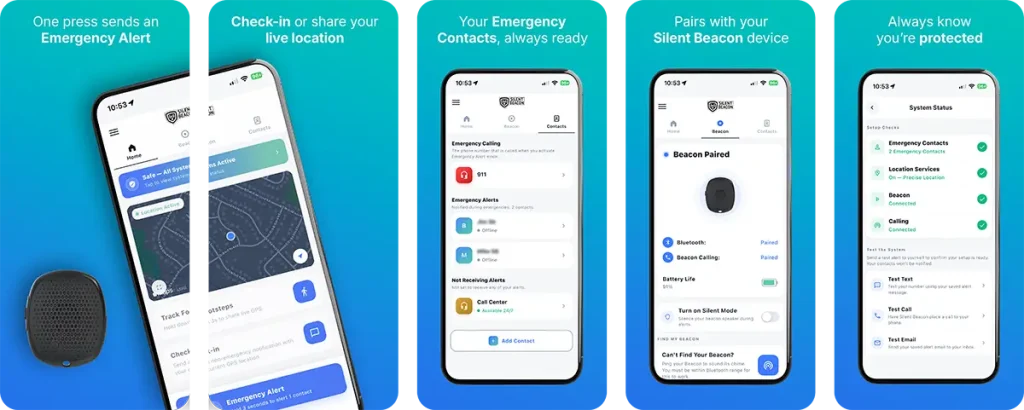
- The Silent Beacon app update is available now on iOS and Android, and it brings a completely redesigned interface, a new System Status page, and a new firmware release for the Silent Beacon 2.0.
- System Status checks your emergency contacts, location settings, and Beacon connection in one view, then lets you send yourself a test text, test call, or test email to confirm your setup works. Your contacts are not notified when you test.
- Firmware 222 improves how your Beacon is identified during scanning, so pairing is faster and more accurate, which helps most in households with more than one device.
- To get everything, install the latest version of the app, then update your Beacon to Firmware 222.
- Bonus: you can now schedule a Fake Call, a realistic incoming call on a delay you choose. Fake Call requires a subscription plan.
Silent Beacon has released a major update to its consumer app on iOS and Android. The app has been completely redesigned, and the release adds a new System Status page for verifying and testing your setup, plus a new firmware version that makes pairing your Beacon faster and more accurate.
Silent Beacon’s 2.0 panic button is the part you carry. The app is the part that carries it out: your alert, your location, and the two-way call that connects you to help. This release is a significant investment in that experience.
What's New in This Release
A Completely Redesigned App
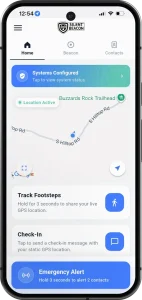
The app has been rebuilt from the ground up with a fresh look and a cleaner, more intuitive interface. Navigation is simpler, the things people do most often are easier to find, and setup moves faster.
System Status
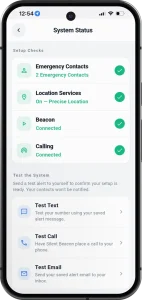
System Status is a new page that answers a question users have been asking for years: how do I know this is working?
It shows the state of each part of your setup in one view:
Emergency Contacts
Whether you have contacts saved, and how many.
Location Services
Whether location access is enabled, and whether precise location is on.
Beacon
Whether your device is currently connected.
Calling
Whether your device is paired for calling.
Each item shows a clear indicator, so a problem is visible at a glance instead of buried in a settings menu.
Below that, you can test the system for real. Send yourself a test text, have Silent Beacon place a test call to your phone, or send a test email to your inbox. You see exactly what your setup produces.
Your emergency contacts are not notified during a test. That detail matters more than it sounds. The reason most people never test a safety device is that they assume testing means alarming the people they love. It does not, so you can check as often as you want.
Firmware 222 for Faster, More Reliable Pairing
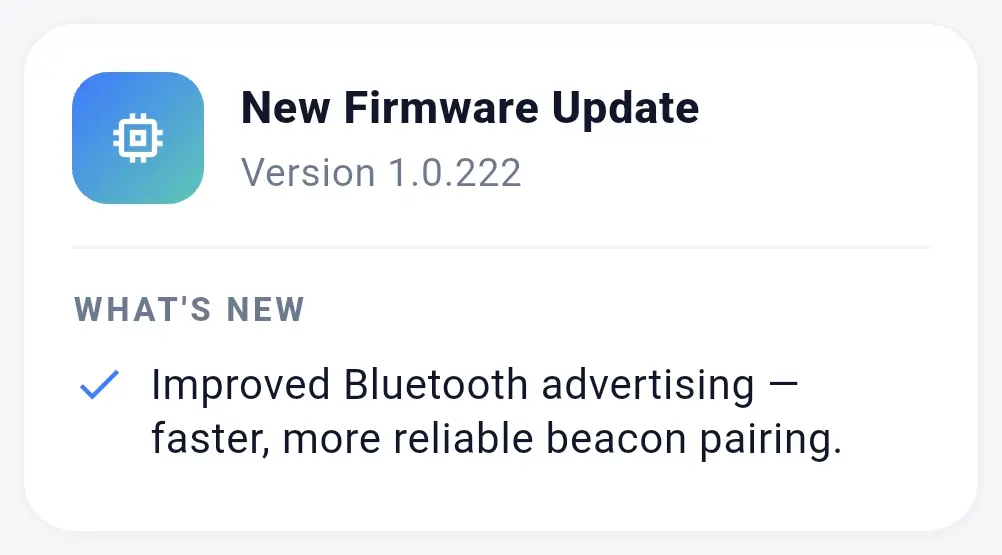
Alongside the app, we released a new firmware version for the Silent Beacon 2.0. Firmware 222 adds MAC address discovery to the connection process, so your device is identified more precisely when the app scans and pairing is quicker and more accurate. The improvement is most noticeable if there is more than one Beacon in your home, where telling devices apart previously took more guesswork.
The redesign also makes the rest of the app easier to get around, including plan features like Check-In, Footsteps, and customizable alert messages. See what a plan includes
Bonus: you can now schedule a Fake Call
Fake Call gives you a realistic incoming call as a discreet way out of an uncomfortable situation, and with this release you can set it in advance. Choose a delay of five seconds, ten seconds, thirty seconds, one minute, or five minutes, and the app confirms the call is on its way. Your phone then rings like any other incoming call. Fake Call requires a Silent Beacon subscription plan.
How to Get the Update
- Update the app. Install the latest version from the App Store or Google Play.
- Update your Beacon to Firmware. Open the app and follow the firmware update prompt for your device.
- Open System Status and run a test. Confirm your contacts, location settings, and connection are set, then send yourself a test text, call, or email.
What This Does Not Change
The Silent Beacon 2.0 pairs to your smartphone over Bluetooth and uses your phone’s cellular or wifi signal to place the call and send your alerts. Everything in this release makes that setup easier to manage, easier to verify, and easier to navigate. None of it changes how the underlying system connects.
Frequently Asked Questions.
Is the Silent Beacon app update free?
Yes. The app update and Firmware 222 are both free for existing users. Download the latest app version from the App Store or Google Play. Some features in the app, including Fake Call, Check-In, Footsteps, and message customization, require a subscription plan.
Will my emergency contacts be notified when I run a test?
No. Test alerts go only to you. The test text goes to your own number, the test call comes to your phone, and the test email goes to your inbox. Your contacts receive nothing.
How does the scheduled Fake Call work?
You pick a delay of five seconds, ten seconds, thirty seconds, one minute, or five minutes. The app confirms the call is on its way, and your phone rings at the time you set. Fake Call requires a subscription plan.
What does Firmware 222 actually change?
It adds MAC address discovery during the connection process, so your Beacon is identified more precisely when the app scans. The result is faster, more accurate pairing, particularly when multiple devices are nearby.
Update Your App Today
A personal safety device only helps protect you if it is set up and ready. Now you can confirm that in about a minute.
Update the Silent Beacon app on the App Store or Google Play, then open System Status and send yourself a test alert.
Do not have a Beacon yet?
See how the Silent Beacon 2.0 panic button works, or browse personal safety devices to find the setup that fits your routine.
One thought on “Introducing the New Silent Beacon App”
Comments are closed.