Silent Beacon for Business · ESS app

The workplace safety app that lets your team call for help fast

Built for the people on the front lines. Silent Beacon for Business puts emergency alerts, live location sharing and quick check-ins on every employee's phone, so no one has to feel alone on the job.

Get a Quote

Requires a Silent Beacon for Business account

Direct 911 with two-way audioLive GPS locationSOC 2 Type 2 compliant
Silent Beacon for Business app home screen with an Emergency alert active, sharing the employee's location on a live map
Compassus logoNew York Public Radio logoReading Truck logoGoddard Riverside logoMental Health Cooperative logoCity of Kelowna logoAccess Health Louisiana logo

In the app

Everything your employees need, right on their phone

The Silent Beacon for Business app puts help, location sharing and quick check-ins on every employee's phone, and keeps your safety team in the loop from the moment an alert starts to the final outcome.

Emergency AlertReach 911 with two-way audio and alert your team.
Check-InSend a quick “I'm OK” with GPS location, no emergency needed.
Track FootstepsShare a live route on the way to a visit or a late walk to the car.
Silent ModeKeep alerts quiet when drawing attention isn't safe.
Group alertsSee alerts from teammates who have you in their alert groups.
Alert outcomesClose every alert with what happened and a note for your records.
Silent Beacon for Business app home screen sharing Footsteps live with a map of the employee's location and a Stop Sharing button

How it works

From the first alert to all clear

The app and the Dashboard work as one system, so the right people are alerted and nothing gets lost after.

1

Send the alert

Start an Emergency Alert from the app, or press the button on a paired Silent Beacon wearable. Silent mode keeps it quiet when that's safer.

2

Connect

911 connects with two-way audio, live GPS is shared, and the right alert group is notified in the app and the Dashboard.

3

Resolve

When it's over, the employee picks what happened and adds a note. The outcome is saved to alert history for your review.

Features

Everything your team needs in one workplace safety app

Built for organizations with staff in the field, on night shifts, in clients' homes, or anywhere they could end up alone.

Direct 911 with two-way audio

Employees talk to 911 dispatch through two-way audio, so help hears exactly what's happening.

Live GPS and Footsteps

Location is shared during an alert, and Footsteps lets employees share their route when they choose.

Alert groups

Route alerts by site, shift and role, so the right people are notified.

Check-In

A quick, non-emergency “I'm OK” with GPS location, so quiet moments are covered too.

Alert outcomes and history

False alarm, just testing or emergency resolved. Every alert, outcome and note is kept for reviews and reports.

Mass Alert Portal Add-on

Add mass alerts to send lockdown, evacuation, weather and all-clear messages by SMS, email and voice.

For safety leaders

The app for employees. The Dashboard for your safety team.

Whether your team works in one building or across a whole state, administrators see every site and every alert from the web Dashboard.

Live mapSee active and resolved alerts across every site.
Users and groupsAdd staff and set who gets which alerts.
Alert historyEvery alert, outcome and note in one place.
Mass alerts (add-on)Reach a building, a site or everyone.
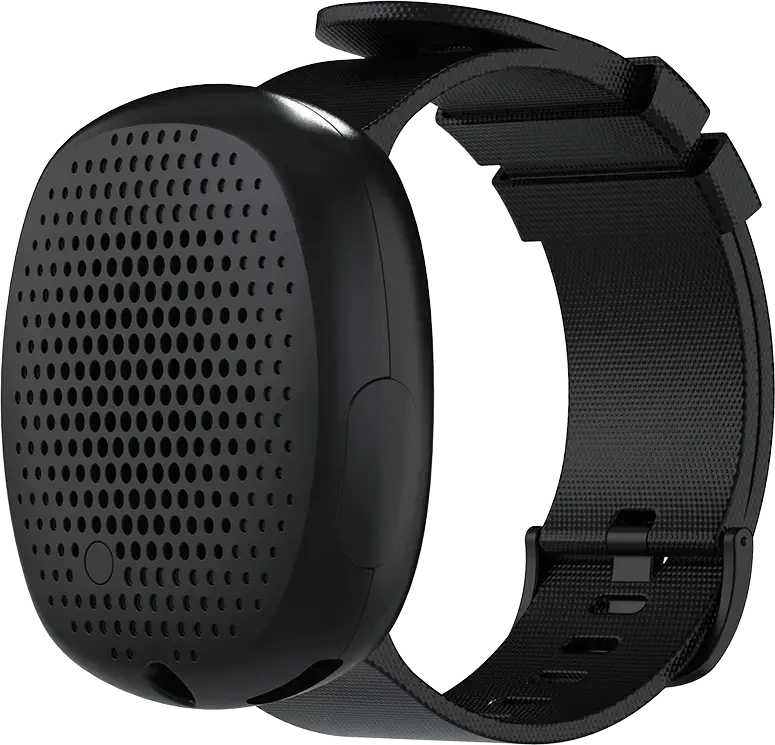
Silent Beacon 2.0 wearable panic button on a wristband

Pairs with Silent Beacon wearables

Pairs great with our wearable panic buttons

For the moments when reaching for a phone isn't practical, add a Silent Beacon wearable. It pairs with the app, and one press starts the same alert, so the phone can stay in a pocket or bag.

  • Wear it on a wrist, clip or lanyard
  • One press sends the alert to 911 and your team
  • Talk to 911 hands-free through two-way audio
  • Silent mode when quiet is safer
See our wearable panic buttons
“I had to run after the person and it was just perfect that it was right there and I could contact the police in motion.”
Andrea Hasko-MarxRecovery Support Specialist Lead, Association for Individual Development

Read more customer stories

Compliance

Meet panic button laws with a record you can show

More states now require panic buttons for employees who work alone or face the public. Silent Beacon for Business gives every employee a way to call for help, and every alert is logged, including drills marked as tests.

SOC 2 Type 2 compliantEmployee and location data handled to an audited standard.
See the laws we track
WA
Washington HB 1524

Panic buttons for isolated workers in hotels, retail, security and janitorial.

Jan 1, 2026
NY
New York Retail Worker Safety Act

Silent response buttons for retailers with 500+ employees.

Jan 1, 2027
K-12
Alyssa's Law

Mobile panic alerts for schools.

Growing list of states

Summaries are not legal advice. Review requirements with your legal and compliance team.

Business or personal?

Which Silent Beacon app is right for you

Protecting yourself or a family member? The Personal Safety App is made for you. Protecting a team? Choose Silent Beacon for Business.

Personal Safety AppBusiness app (ESS)
Emergency Alert in the app✓✓
Pairs with Silent Beacon wearables✓✓
911 with two-way audio and GPS✓✓
Alerts your contactsFamily and friendsYour safety team, by group
Web Dashboard and live map—✓
Alert outcomes and history—✓
Mass Alert Portal—Add-on
Central user and device management—✓
How you get itDownload and sign upThrough your organization's Business account

FAQ

Workplace safety app questions

What is a workplace safety app?

A workplace safety app lets staff call for help at work and lets the organization respond. The Silent Beacon for Business app gives employees an Emergency Alert that connects to 911 with two-way audio, shares live GPS location and alerts your safety team. It also pairs with Silent Beacon wearable panic buttons.

Can anyone download the app and use it?

No. The app requires a Silent Beacon for Business account. Your organization sets up the account with us, then employees download the app and sign in with the login their organization provides.

Does the app track employees all the time?

No. Location is shared during an alert, when an employee sends a Check-In, and on Footsteps routes the employee chooses to share. It isn't an all-day tracking tool.

Do employees need to take out their phone to send an alert?

No. Employees can send an Emergency Alert from the app. With a paired Silent Beacon wearable, one press sends it while the phone stays in a pocket, and employees can talk to 911 hands-free. Silent mode keeps it quiet when that’s safer.

Who receives the alert?

911 and the alert groups you set up, such as a site, a shift or a role. Alerts appear in the app and on the Dashboard live map.

Is it a good lone worker app?

Yes. It's built for people who work alone, travel, or visit clients and patients, with GPS location, Footsteps route sharing and Check-In for non-emergency “I'm OK” updates. See our lone worker safety page for more.

How is this different from the Silent Beacon Personal Safety App?

The Personal Safety App alerts family and friends. The business app adds alert groups, the web Dashboard, alert outcomes and history, central management (plus the Mass Alert Portal as an add-on) for your whole team.

Can it help with panic button laws and audits?

It gives employees the panic button many laws require and keeps a record of every alert and how it was resolved, with drills marked as tests. Silent Beacon is SOC 2 Type 2 compliant.

Protect your team with Silent Beacon for Business

The Silent Beacon for Business app is available to organizations with a Business account. Tell us about your team and we'll set up the app, the Dashboard and any wearables you need.